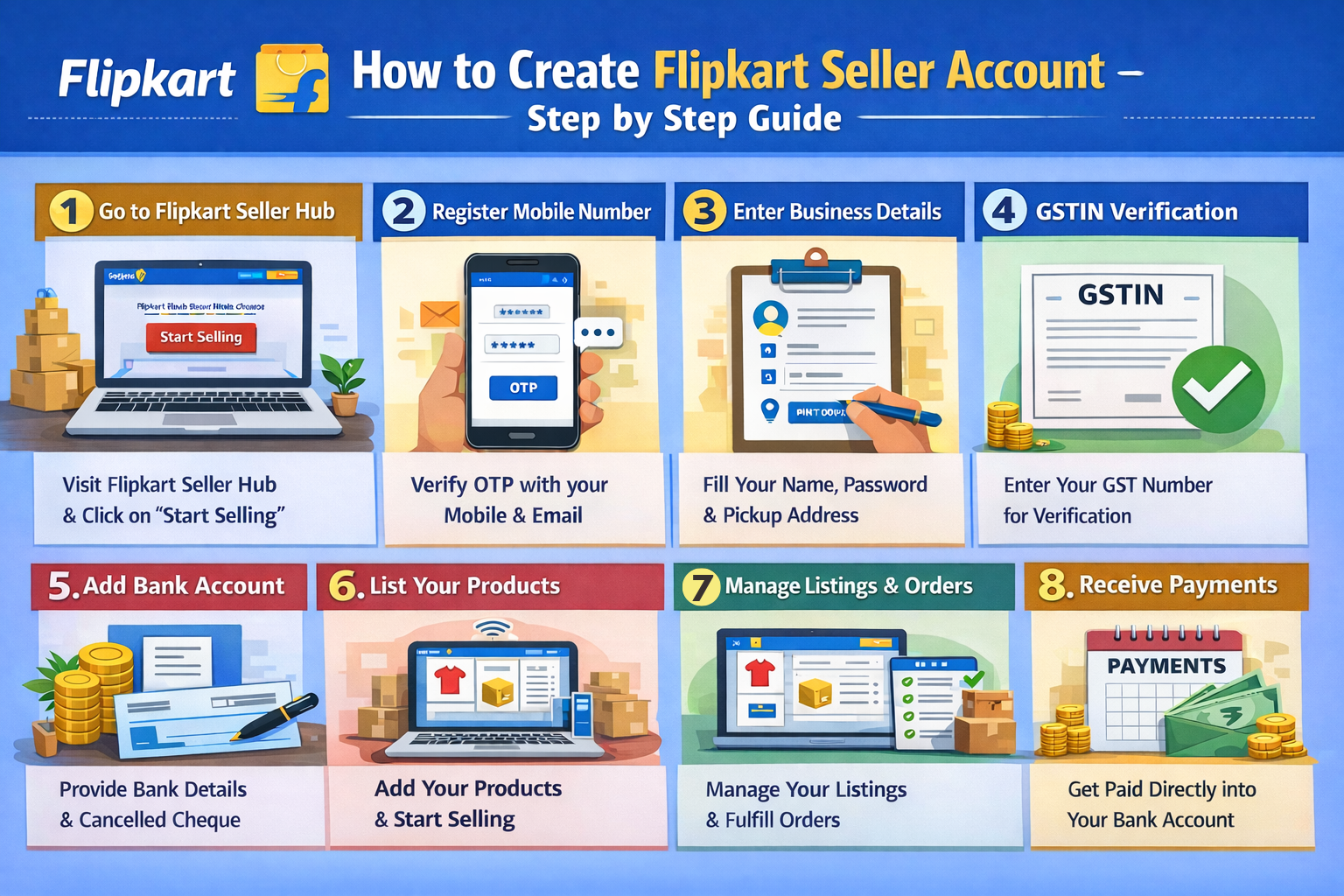
Flipkart is one of India's leading e-commerce platforms, connecting millions of sellers with customers across the country. If you want to grow your business online, becoming a Flipkart Seller is an excellent opportunity. In this comprehensive guide, we will explain how to create a Flipkart Seller account and start selling your products.
Whether you are a retailer, wholesaler, or manufacturer, Flipkart provides a robust platform to showcase your products to a massive audience.
Documents Required for Flipkart Seller Registration
Before starting the registration process, ensure you have the following documents handy:
- GSTIN (GST Identification Number): Essential for selling taxable goods on Flipkart.
- PAN Card: Required for identity and tax verification.
- Bank Account Details: Cancelled cheque and account details for receiving payments.
- Address Proof: Electricity bill, rent agreement, or other valid address proof.
- Mobile Number & Email: For OTP verification and account management.
Note: Make sure your mobile number and email ID are active, as all important notifications and order updates will be sent there.
Step-by-Step Process to Create Flipkart Seller Account
Step 1: Go to Flipkart Seller Hub
Visit the official Flipkart Seller Hub website and click on the 'Start Selling' button.
Step 2: Register Mobile Number
Enter your 10-digit mobile number. You will receive an OTP. Verify it to proceed. Then, enter your email address and verify it as well.
Step 3: Enter Business Details
Provide your Full Name and set a secure password for your account. Enter your Pickup Pincode correctly, as this determines which logistics partner will handle your shipments.
Step 4: GSTIN Verification
Enter your GSTIN number. Flipkart will verify your business details automatically. If you don't have GST, you can only sell GST-exempt categories like books.
Step 5: Add Bank Account
Enter your bank account number and IFSC code. Flipkart will deposit a token amount to verify the account. Upload a cancelled cheque if requested.
Step 6: List Your Products
Once your account is verified, you need to list at least one product to make your store live. You can use the bulk listing tool or add products individually.
Why Choose Flipkart for Selling?
- Massive Reach: Access to millions of registered customers across India.
- Fast Payments: Reliable payment cycle of 7-15 days.
- Logistics Support: Ekart Logistics ensures timely pickup and delivery of your products.
- Seller Support: Dedicated support for managing your account and resolving issues.
Understanding Flipkart's Commission Structure
Before pricing your products, it's critical to understand the deductions Flipkart makes before settling your payments. The primary fees include:
- Referral Fee: A percentage of the selling price, varying wildly by category (e.g., typically 5-8% for electronics vs. 15-20% for fashion and apparel).
- Fixed Closing Fee: A flat amount charged per order based on the item's price bracket.
- Shipping Fee: Calculated based on the weight slab of your packaged item and the shipping distance (Local, Zonal, or National).
Securing Packaging Materials & Fulfilling Orders
Flipkart enforces strict packaging guidelines to ensure products arrive safely. While you can sometimes use plain boxes depending on the category, many sellers are required to purchase Flipkart-branded packaging material (like polybags and corrugated boxes) from approved vendors found directly inside the Seller Hub.
Getting the 'Flipkart Assured' (F-Assured) Badge
The F-Assured badge is Flipkart's stamp of quality and speed. Products with this badge see significantly higher conversion rates. To qualify, a seller must maintain exceptional performance metrics (low return rate, zero dispatch breaches, high customer ratings) and often route their inventory through Flipkart Fulfillment (FF) centers.
Flipkart Label Crop Tool
Smart label formatter. Separate labels and invoices for your thermal printer in one click.
Conclusion
Setting up a Flipkart Seller account is a straightforward process that grants you access to one of India's largest e-commerce ecosystems. By understanding the commission structures, securing proper packaging, and aiming for the F-Assured badge, you can scale your retail business to new heights. Once your first order drops in, ensure your dispatch process is lightning fast by leveraging automated label processing tools.
Frequently Asked Questions
Yes, a valid GSTIN is mandatory to sell most products on Flipkart, except for GST-exempt categories like books.
Once all documents are uploaded and verified, your account can be active within 24-48 hours.
The F-Assured badge is a stamp of quality and faster delivery, which helps sellers increase their sales and search visibility significantly.
🚀 Grow Your Seller Account with Our Tools
Process labels 10x faster, calculate absolute profit metrics and improve product listings instantly!