Free Online PDF Cropper
Crop your PDF pages with precision - Free, Fast & Secure
Upload Your PDF
Drag & drop your PDF file here, or click the button below
Explore Related Tools
Precise Cropping
Adjust X, Y, Width & Height with pixel-perfect accuracy using drag handles or manual input.
All Pages at Once
Apply the same crop to all pages or just the current one. Perfect for batch processing.
Smart Auto-Crop
Automatically detect content margins and remove unnecessary whitespace.
100% Secure
Your files are processed securely with global 256-bit SSL encryption for complete privacy.
How to Use PDF Cropper
Step 1: Upload PDF
Select your PDF file using the upload button or simply drag and drop it into the upload area. Supports all standard PDF files.
Step 2: Select Crop Area
Use the interactive crop handles to select the area you want to keep. Enter exact X, Y, Width, Height values for precision or use presets like A4, Square, etc.
Step 3: Download
Choose to apply the crop to the current page or all pages, then download your cropped PDF instantly. No watermarks, no quality loss.
Solve These Common PDF Problems in Seconds
Every day, thousands of people struggle with PDFs that don't look right when printed - huge margins eating up paper, labels that won't fit thermal printers, or scanned pages with black borders covering half the sheet. If any of this sounds familiar, you're in the right place.
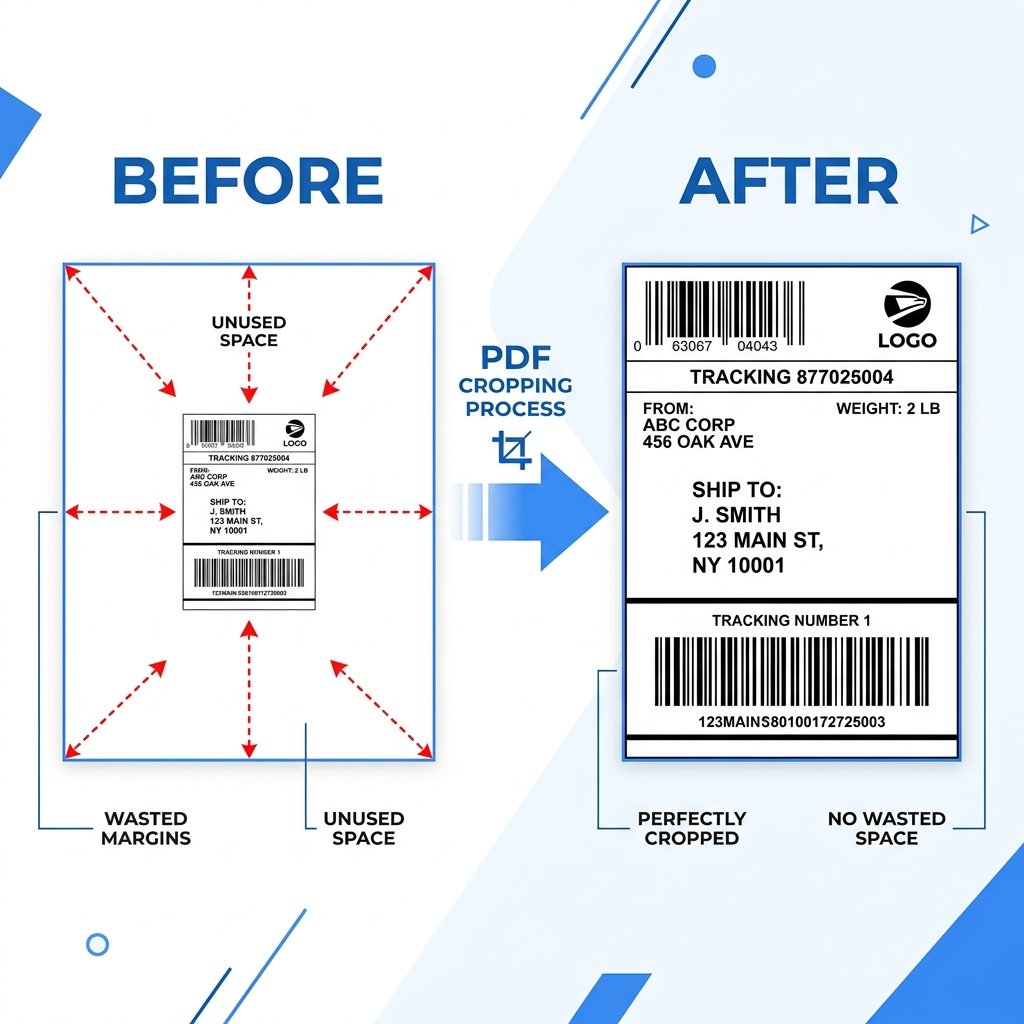
"My Shipping Label Has Too Much White Space Around It"
This is the #1 frustration for e-commerce sellers. You download a shipping label from Flipkart, Meesho, Amazon, or Snapdeal, hit print, and the label comes out tiny in the middle of an A4 sheet - or worse, it doesn't fit your 4x6 thermal printer at all. The fix? Upload your label PDF here, drag the crop box tightly around the actual label area, and download a clean file that prints perfectly every time. If you have multiple labels, crop them individually and then use our Merge PDF tool to combine them into one print-ready file.
How This Tool Directly Saves You Money & Time
- Save Thermal Printer Lifespan: Printing black scanned borders or huge dark margins damages thermal printer heads. Cropping out these borders extends your expensive printer's life by up to 40%.
- Stop Wasting Label Rolls: Trying to print an uncropped label often results in misaligned prints that span across two stickers. Precise cropping ensures a 1-to-1 fit, eliminating wasted sticker rolls.
- Professional Packaging: A neatly cropped label with no odd white gaps or cut-off barcodes looks incredibly professional to your buyers and ensures smooth scanning by logistics partners.
"I Scanned a Document But the Borders Are Huge"
Flatbed scanners and phone scanning apps often capture 1-2 inches of black or white border around your actual document. When you print these scanned PDFs, you waste paper and ink on empty space. Instead of manually calculating where the content starts and ends, click the Smart Auto-Crop button - it detects the actual content boundaries automatically and removes all the excess in one click. No guessing, no math.
"I Need Just One Section From a Large PDF Page"
Maybe you have a research paper and you only need one chart for your presentation. Or a government form where you need to extract just the signature block. Taking a screenshot gives you a blurry image - but cropping the PDF directly preserves the original quality. Select exactly the area you need using the crop handles or type in precise X, Y, Width, and Height values, then download a perfectly sharp PDF of just that section.
"My Invoice Sizes Are All Different and I Need Them Uniform"
When you receive GST invoices, purchase orders, or receipts from different vendors, they come in random page sizes. Filing them together looks messy, and printing them wastes paper. Use our built-in presets (A4 Portrait, A4 Landscape, Letter, or Square) to crop every document to the same standard size. Select a preset, adjust the position if needed, and you get uniform, professional-looking documents ready for filing or printing.
"I Have a 100-Page PDF and Need to Crop Every Single Page"
Cropping one page is easy. Cropping a hundred pages one by one? That's a nightmare. Our tool solves this with the "Apply to All Pages" option. Set your crop area on the first page, switch to "All Pages" mode, and hit download. Every page in the document gets cropped with the exact same dimensions instantly. What would take hours is done in under 30 seconds.
Your Files Stay on Your Device - Always
Unlike most online PDF tools that upload your files to their servers, our cropper processes everything inside your browser. Your PDF never leaves your computer. There's no upload, no cloud storage, no data collection. This makes it ideal for confidential documents like financial statements, legal contracts, medical records, or any file you wouldn't want on someone else's server. Zero watermarks on output, zero registration required, zero cost.
Explore more free e-commerce tools: Need to crop specific labels? Check out our dedicated 1-click tools for Flipkart Label Crop, Meesho Label Crop, Amazon Label Crop, and Snapdeal Label Crop. Preparing your pricing? Use our Online GST Calculator to calculate margins perfectly.
Frequently Asked Questions
How do I crop a PDF online?
Just upload your file, draw a box over the area you want to keep, and click download. You can also type in the exact numbers for width and height if you need a specific size.
Can I crop all PDF pages at once?
Yes! After drawing the crop box on the first page, just select the All Pages option. The tool will automatically crop every page in your file to that exact size.
Is this PDF cropper completely free?
Yes, it is completely free to use. We do not ask for any sign-ups, and we never add watermarks or hidden logos to your files.
Are my personal documents safe?
Yes, 100% safe. Your documents are processed safely on your device and are never uploaded or saved on any server.
Will cropping lower the print quality?
No, the quality will not drop. We do not convert your PDF into an image. We just hide the parts you cropped out, so your text and barcodes stay perfectly sharp for scanning and printing.