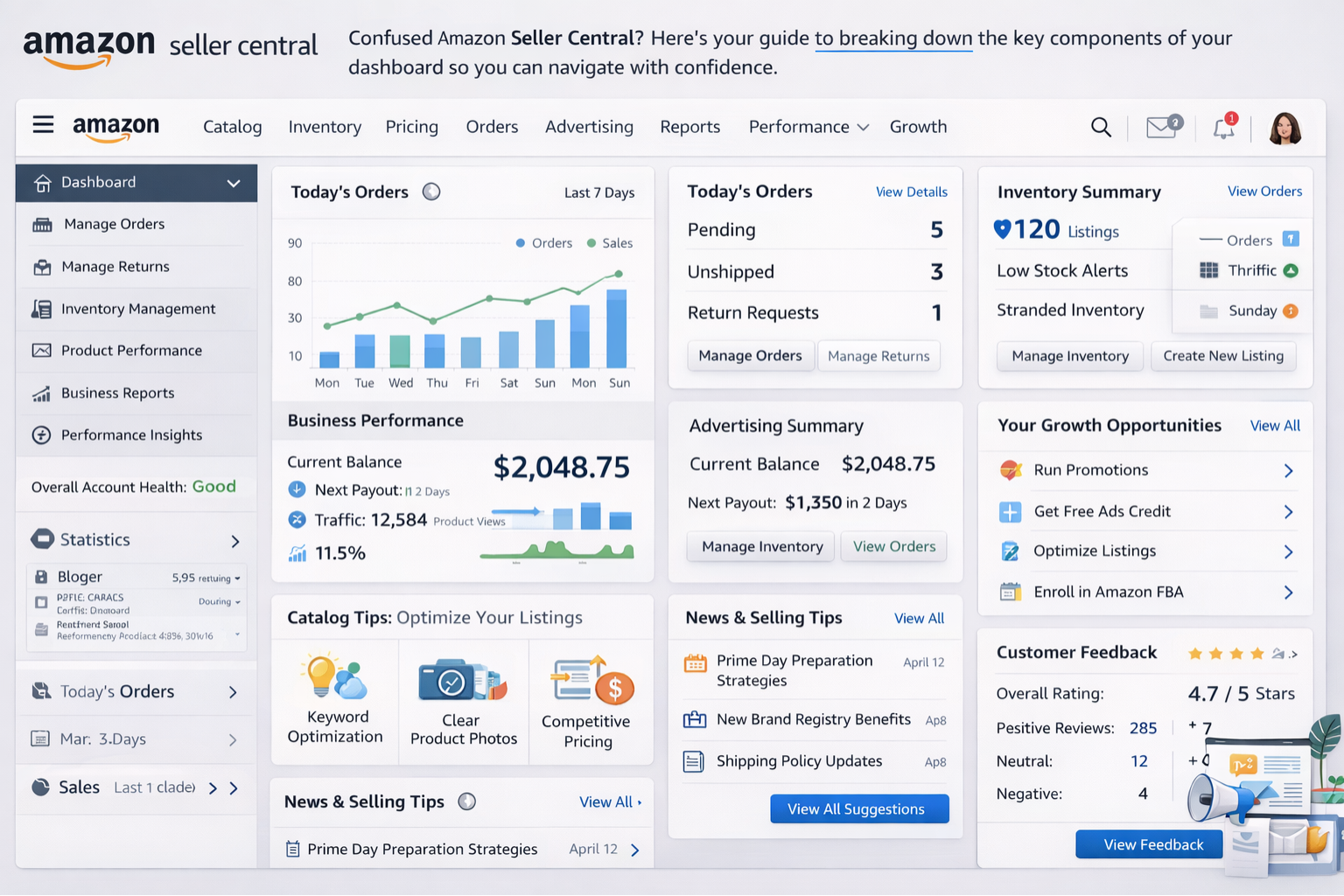
Amazon's Seller Central is widely considered the most comprehensive and data-rich seller dashboard in the ecommerce world. For a new seller or supplier, it can be overwhelming. This guide breaks down the critical components of your Amazon panel to help you navigate with confidence.
1. The Dashboard Homepage
Your customizable homepage offers widgets for:
- Today's Sales: Real-time sales data.
- Buyer Messages: Pending customer inquiries (must reply within 24 hours!).
- Buy Box Wins: Percentage of time your offer is the featured one.
2. Inventory Management
The 'Manage Inventory' page is where you track stock.
- FBA Inventory: Track shipments sent to Amazon warehouses.
- Merchant Fulfilled: Manage stock you ship yourself.
Keeping your IPI (Inventory Performance Index) score high is crucial for FBA sellers.
3. Account Health Dashboard
This is the most critical part of the panel. It monitors:
- Order Defect Rate (ODR): Must be under 1%.
- Late Shipment Rate: For self-ship sellers.
- Policy Violations: IP complaints or authenticity issues.
Ignoring this tab can lead to account suspension.
4. Orders & Shipping
Under 'Manage Orders', you can print packing slips and confirm shipments.
Amazon Label Crop Tool
Instantly format and crop shipping labels for your thermal printers.
5. Advertising Console
The 'Campaign Manager' is your marketing hub. Here you can:
- Create Sponsored Products ads.
- Track ACOS (Advertising Cost of Sales).
- Optimize keywords to rank higher.
6. Reports & Analytics
Amazon provides granular data. The 'Business Reports' section shows traffic and conversion rates by ASIN. This data helps you understand which products are performing well and which need improvement.
Free Merge PDF Tool
Combine your monthly sales reports and GST bills into a single PDF for your tax accountant.
7. Pro-Tips for Dominating Seller Central
To truly escape the 'beginner' phase and avoid the common pitfalls that cause seller suspensions, keep these advanced tips in mind:
- FBA vs FBM Balance: Relying 100% on Merchant Fulfilled (FBM) puts your account health entirely on your own logistics. Having at least a few high-velocity items in FBA (Fulfilled by Amazon) buffers your metrics and ensures you retain the Prime badge.
- Automate Pricing Tools: Don't manually chase the Buy Box. Use Seller Central's built-in Automate Pricing tool to set minimum and maximum price guardrails. The system will adjust your price automatically to compete against other sellers without dropping below your profitability threshold.
- Stranded Inventory Checks: A hidden profit killer is 'Stranded Inventory'. This happens when your inventory is at an Amazon fulfillment center but there is no active offer for it. Check this weekly under the Inventory Dashboard to avoid long-term storage fees on dead stock.
- Utilize A+ Content: If you are brand registered, plain text descriptions are a massive missed opportunity. A+ Content allows you to add rich images, comparison charts, and brand stories to your product detail pages, significantly increasing conversion rates.
8. Common Dashboard Challenges & Solutions
Even experienced sellers run into dashboard errors. Being prepared for these can save your business days of downtime.
- Listing Suppressed: If your listing suddenly disappears, it's usually due to a missing standard product ID, main image non-compliance (missing a pure white background), or restricted keywords. Check the Fix Your Products page immediately.
- High ACOS on Auto-Campaigns: When your Advertising Cost of Sales skyrockets on automatic campaigns, the solution is 'Negative Keyword Harvesting'. Download your Search Term Report weekly and add broadly irrelevant, expensive search terms to your negative targeting list.
- The 'Account at Risk' Warning: The most terrifying banner in Seller Central. Usually caused by late shipping or a sudden spike in A-to-Z Guarantee claims. The key is to respond to the performance notification with a detailed Plan of Action (POA) outlining exactly how you have upgraded your internal quality control to prevent the issue from happening again.
9. Advanced Keyword Optimization Strategies
Your dashboard's Search Query Performance report is a goldmine for SEO. It shows exactly what customers are typing before they buy your product. To maximize your visibility:
- Backend Search Terms: Don't repeat words already in your title. Use the 250 bytes of backend search terms for common misspellings (e.g., 'vacum' instead of 'vacuum'), Spanish translations if selling in the US, and latent semantic indexing (LSI) keywords.
- Title Anatomy: A highly optimized title looks like this: [Brand Name] + [Core Keyword] + [Key Feature 1] + [Key Feature 2] + [Material/Color/Size]. Do not stuff keywords unnaturally, or Amazon's algorithm will throttle your impressions.
- Bullet Points (Features): Dedicate the first two bullet points to the most important benefits. Use all capital letters for the first few words of each bullet point to make them scannable (e.g., "GUARANTEED DURABILITY: Made with premium grade...").
10. Understanding Amazon Fees Breakdown
A high sales volume doesn't mean high profits if fees eat your margins. Familiarize yourself with the Payments Dashboard under the Reports tab:
- Referral Fees: This is Amazon's 'commission' for letting you sell on their platform. It generally ranges from 8% to 15% depending on the exact product category. Electronics carry lower percentages, while Amazon Device Accessories carry the highest.
- FBA Fulfillment Fees: If you use Fulfillment by Amazon, you pay a flat rate per unit based on its size and weight. To lower this, look into optimizing your product packaging to push it down into a smaller tier (e.g., from 'Large Standard' to 'Small Standard').
- Long-Term Storage Fees: Inventory sitting in fulfillment centers for more than 365 days gets hit with aggressive surcharges. Use the Inventory Age report to set up automatic removals or fire-sale discounts before the 12-month mark.
Conclusion
Amazon's Seller Dashboard is a powerful tool. While it has a learning curve, mastering its features from Account Health to Advertising is the secret to becoming a top supplier. Combine this knowledge with our efficiency tools to stay ahead of the competition. You can also use our Amazon Label Crop tool to speed up your order processing.
Frequently Asked Questions
The Account Health Dashboard is the most critical as it monitors policy violations and performance metrics like Order Defect Rate (ODR).
You can see real-time sales data on the Today's Sales widget on your Seller Central homepage or via detailed Business Reports.
Payment summaries and transaction details are located under the Reports tab in the Payments Dashboard.
🚀 Grow Your Seller Account with Our Tools
Process labels 10x faster, calculate absolute profit metrics and improve product listings instantly!